Interactive AR project - Stage 1


This is my second Augmented Reality application. My aim for this project is to create an interactive app featuring a little dinosaur that has to defeat some creepy monsters by incinerating them with his fire breath.
Stage 1
My first goal was to learn how to move a character through space whilst switching between two different animations: one that played when the character is waiting, and another one that played every time the character moves around the space. For this, I also wanted to incorporate a screen joystick to control the character’s movements.
So my first task was to make two separate animations of my 3D rigged model:
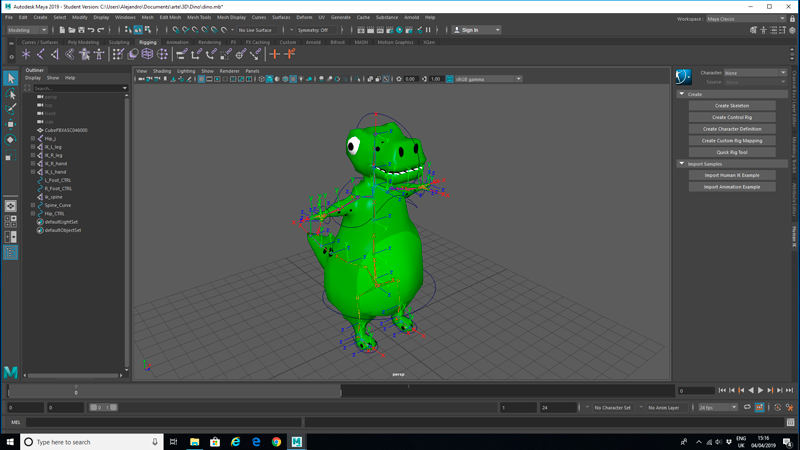
I found a great YouTube tutorial that had almost everything I needed. It was a bit out of date, so I had to look for a secondary source to understand how to use the Vuforia plugin nowadays. It is actually easier, as it is already included in Unity from version 2017.02 onwards. I managed to replicate the Donald Trump app, it worked! My next step was to use my own 3D model/animations.
In order to create my own project, I had to spend a bit of time understanding how image targets work. One of the first things I learned is that Vuforia ranks your images from zero to 5 stars. My first image got zero!!!

After doing a bit of research, I found a very good guide (on Vuforia’s website), and I went from zero to one and finally up to three stars!


It turns out that images with high contrast and non-repetitive patterns make much better targets!
So I used this image as my target image for my project:

I even took the risk of adding a flat terrain for the character to walk on top of it, and it worked!

Finally, I compiled my project and uploaded it to my phone using an app called Android File Transfer (I had to do this as I was working on a Mac; Windows PCs allow you to connect directly to your Android phone).

And this is a video of me testing the first stage
From here, I am planning to build a more complex environment for the character to walk on top of. So far, I have made some tests, but the character just walks through the 3D meshes.

I did a bit of research and found out that apparently, all colliders are deactivated by Vuforia’s script. Figuring this out is this project’s stage 2.
Resources
First youtube tutorial:https://www.youtube.com/watch?v=khavGQ7Dy3c
Vuforia updated content:https://library.vuforia.com/articles/Training/getting-started-with-vuforia-in-unity.html#about
Vuforia target featureshttps://library.vuforia.com/articles/Solution/Optimizing-Target-Detection-and-Tracking-Stability.html
Android file transferhttps://www.android.com/filetransfer/


Comments